In Define Your Price Bands – you created your Price Bands (Seasons). Now your next step is to apply your prices to those Seasons.
For each Season that you created you should now be adding at least one Rate.
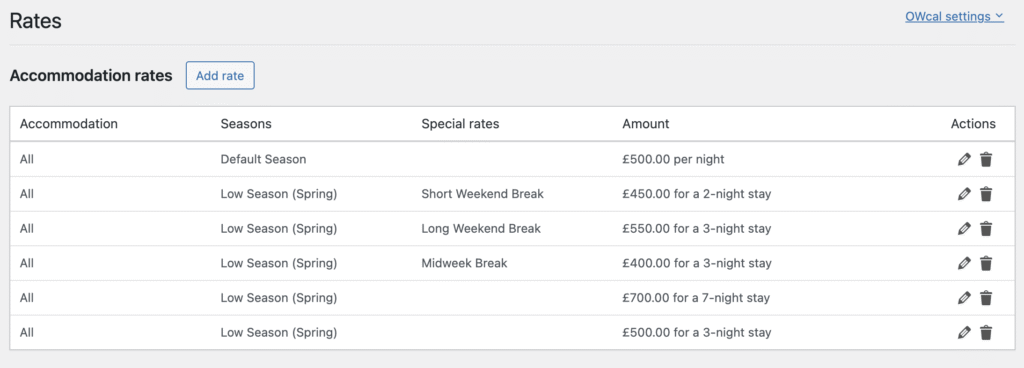
Your prices / rates are input on OWcal > Rates.
Different Methods You Can Use
If your pricing consists solely of weekly rates, then you would simply have one rate per season. You would set this up by creating one rate for 7 days with your weekly price, for each of your Seasons.
If your pricing is based around nightly rates, then you would create a rate for 1 night only. You could also add additional rates for your chosen Season with separate rates for 2,3,4,5,6 or 7 night stays
Multiple Rates Per Season
Each one of the Seasons that you created should have at least 1 rate, but you can set multiple rates per Season.
The example below has 5 different Rates for the Season ‘Low Season (Spring)’