Your website’s pricing system is incredibly flexible. There is almost always a way to achieve the pricing structure you are looking to implement.
Creating nightly rates and weekly rates is very straightforward, however you may wish to offer different pricing depending upon the days of the week that your guests stay.
For example. you may wish to set a higher rate for Friday and Saturday night occupancy. Or do you instead want to charge more for 2 or 3 night stays that fall over the weekend? These requests are slightly different so lets look at how we set these up
This article covers two different methods of setting your pricing for weekends.
- Setting a different nightly rate for specific days of the week.
- Setting special rates for breaks depending on the day of the week the guest checks-in.
Setting Up Different Nightly Rates
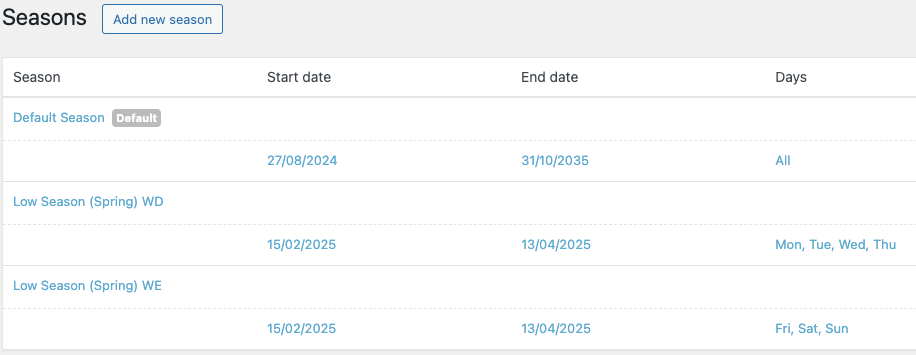
First you will go to your Seasons page from your dashboard and setup two Seasons, one for weekdays, and one for weekends. Both Seasons should share exactly the same date ranges. When finished you should see something like the two ‘Low Season’ examples below:
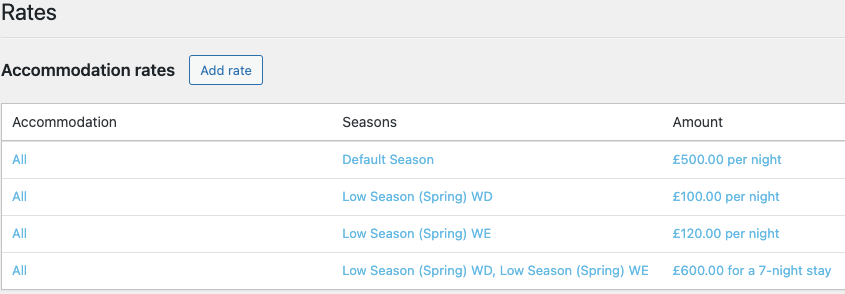
Once you’ve set your Seasons you will need to set your prices or rates for your Seasons. Navigate to your Rates page and setup your separate prices for your weekend rates and your weekday rates. Like you can see in the example below, if you wish to apply a weekly rate as well, or a 4,5,6 nightly rate for that matter, you can do this simply by creating a new rate and ticking both your Seasons.